Skip to content

How it works

How it works

QSteply reads your step count from Apple Health or Health Connect, then shows your progress in quests and StepWars.

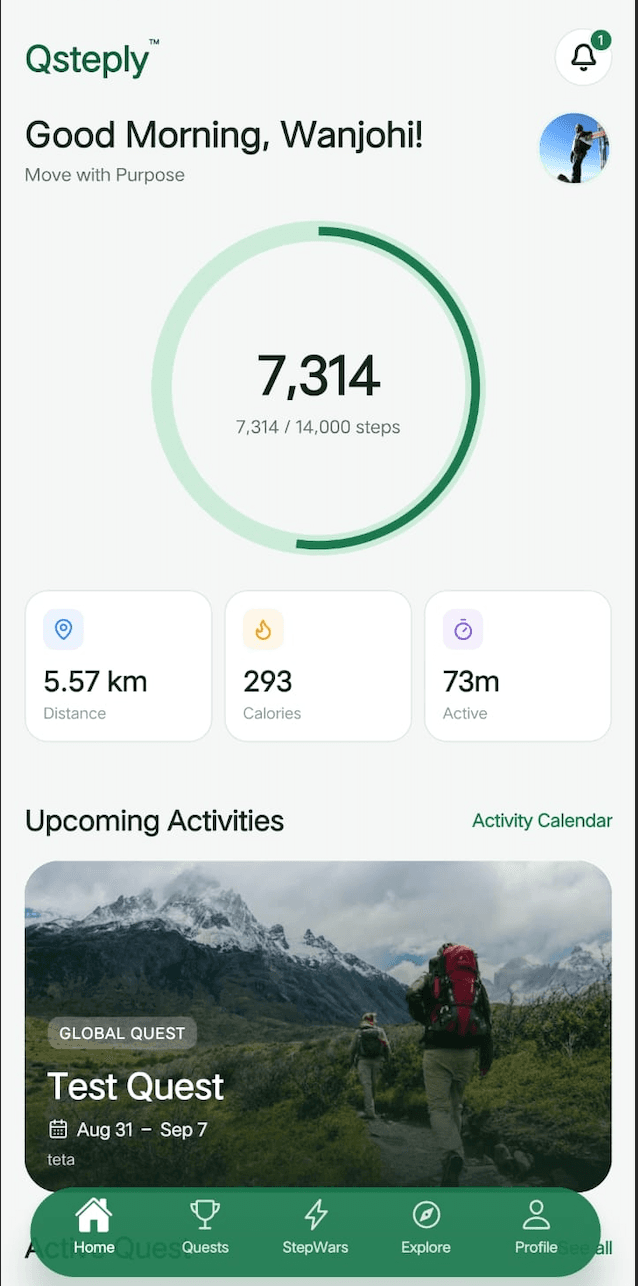
QSteply home screen showing daily step progress, distance, calories, and an upcoming quest

Set up

Connect step count, then create an account. These are the checks the app makes.

Track your steps

Google Fit can write phone steps into Health Connect before QSteply reads them. If Health Connect is missing, the app can use the phone sensor for today’s steps. A fuller history uses Health Connect. Steps sync when you open the app, when you return to it, and again while the app stays open.

  • Step count only, with no write access
  • Apple Health on iPhone
  • Health Connect on Android
  • No GPS

Create an account

If you already have an account, sign in with your email and password.

  • Name, email, phone number, and password
  • Password of at least 8 characters
  • Phone number of at least 10 digits
  • Accept the Terms and the Privacy Policy in the app

From account to standings

The path from a new account to a quest or a team battle.

  1. 01

    Create your account

    Add your name, email, phone number, and a password of at least 8 characters. Accept the Terms and the Privacy Policy in the app.

  2. 02

    Connect your steps

    Allow Apple Health or Health Connect to share your step count. QSteply reads that count and shows your daily progress.

  3. 03

    Join a quest

    Use an invite link or a code, then confirm, or create a private quest. How quests work.

  4. 04

    Enter a StepWar

    Join a team battle or create one, then pick a team or let the host place you. How StepWars work.

  5. 05

    Read progress

    Quest ranks and StepWar standings are in Progress and leaderboards.

Progress and leaderboards

The home screen is where today’s steps, your goal, and your streak meet the standings.

Daily goal

Set it from 1,000 to 100,000 steps. If you have not set one, it starts at 5,000.

Today on the home screen

You also see a distance and a calorie estimate from those steps, and a streak of recent days that have steps. A day with no steps ends the streak, except for today.

Reminders

The app can notify you at halfway and when you reach the goal.

Standings

A quest shows your rank and a leaderboard of everyone who joined. A StepWar ranks teams by average steps. Your profile shows an Explorer Level from this calendar year’s steps. See Quests and StepWars.

Questions

Where do my steps come from?

On iPhone, QSteply reads your step count from Apple Health. On Android, it reads your step count from Health Connect. Google Fit can write phone steps into Health Connect first. If Health Connect is not available, the app can read today’s steps from the phone sensor. A fuller history uses Health Connect.

Does QSteply change my health data?

No. QSteply requests step count only, and it does not write steps back to Apple Health or Health Connect.

What do I need to create an account?

A name, an email address, a phone number with at least 10 digits, and a password of at least 8 characters. You also accept the Terms and the Privacy Policy in the app. If you already have an account, sign in with your email and password.

How do I join a quest or a StepWar?

Open an invite link or enter a code, then confirm. A link does not add you until you confirm. For a StepWar, you pick a team after you join. You can also skip and let the host place you.

What does the home screen show?

Today’s steps against your daily goal, a distance and a calorie estimate from those steps, and a streak of recent days that have steps. You can set the daily goal from 1,000 to 100,000 steps. If you have not set one, it starts at 5,000.

Does QSteply use my location?

No. QSteply does not collect GPS or device location coordinates.

Move with Purpose

Track your steps, follow daily progress, and join quests and team challenges.